platforms · Odoo
FPS in 3 clicks for Odoo
Let your customers settle invoices, website orders and point-of-sale payments instantly with FPS. Pay just 0.75% + HK$2.00 per transaction. No chargebacks. Automatic reconciliation. Settled T+1.
developer? download the plugin on GitHub →
for Odoo 19 (Community or Enterprise) · invoices, website checkout & POS · installs into your addons


one install
three ways to get paid
Odoo Invoicing
Add a FPS by divit pay now link on your Odoo invoices. On mobile, customers can pay in 3 clicks from their banking app. On desktop, customers scan the dynamic FPS QR code with their banking app. No manual entry. Invoices are marked as Paid and settlements are automatically reconciled.
Odoo website checkout
Offer FPS at your Odoo eCommerce checkout. Customers pay in 3 clicks from their banking app. It’s fast, secure and low cost.
Odoo POS
Take FPS at the counter in Odoo Point of Sale. Customers scan dynamic QR codes with their banking app from any screen. No terminals required.
inside odoo
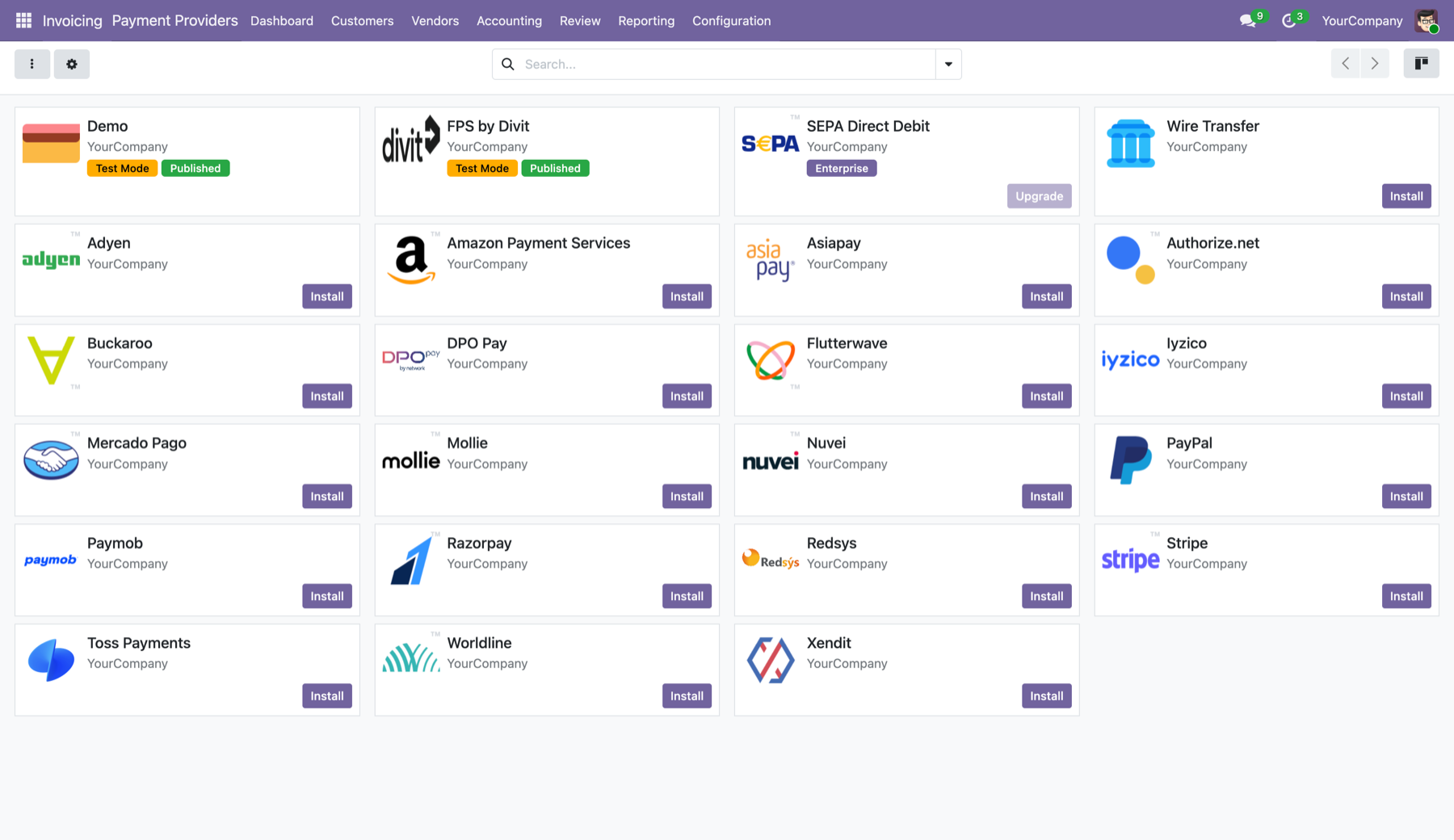
a native payment provider in Odoo
Install once and FPS by divit appears in Odoo’s own Payment Providers, right alongside the global names. Switch it on, add your keys, and customers can pay by bank app on invoices, website checkout and point of sale.
See it end to end in the Odoo and FPS story in our newsroom.
customer experience
seamless and secure
Whether your customer is shopping on their phone or desktop, FPS by divit only takes seconds. No card numbers. No manual entry.
- mobile — click on FPS by divit, click your bank and login, click approve
- desktop — click on FPS by divit and scan the dynamic FPS QR code with your banking app
setup
live in three steps
create your free account
Sign up at admin.divit.com.hk and grab your API keys. It takes around 2 minutes.
install the divit module
Download the divit module from GitHub, add it to your Odoo 19 addons and activate it. It provisions a Divit Clearing journal for you on install.
enable and connect
In Invoicing → Payment Providers → Divit, paste your API keys, set Test or Enabled, and save. No code.
merchant benefits
save money. save time. save now
FPS by divit delivers more than payment savings — we make administration easy.
- instant confirmation — every payment confirmed in real time and matched to its Odoo order
- low-cost pricing — 0.75% + HK$2.00 per transaction, vs ~3.40% + HK$2.35 on cards. no setup or monthly fees
- T+1 settlement — funds in your bank account the next business day (instant settlement available for HK$2.00)
- refund processing — issue refunds in a click from the divit admin portal
- administration portal — a full reconciliation dashboard: every payment, order and payout in one place
get the plugin
the divit module for Odoo, free and open
Add it to your Odoo 19 addons yourself, or hand it to your developer. Built for Odoo 19 Community or Enterprise.
also invoicing from Xero or QuickBooks? One divit account covers them all. See all platforms.
faq
Odoo questions. answered
which Odoo version does the plugin support?
It is built for Odoo 19.0, on Community or Enterprise, with the Invoicing and Payment modules enabled.
does it work with Odoo POS?
Yes. One install covers Odoo Invoicing, website checkout and Point of Sale, so customers can pay by FPS on an invoice, at online checkout or at the counter. POS is tested and working.
where do I download the plugin?
The divit module is free and open on GitHub at github.com/divit-stem/divit-for-odoo. Add it to your Odoo 19 addons, or ask your developer to.
do I need a developer to use divit?
Adding the divit module is a standard Odoo app install; once it’s in, your API keys and enabling FPS are set in Odoo’s own settings, with no code. Xero, QuickBooks and WooCommerce connect with no install at all.
how do refunds work?
Refunds are processed in the divit Merchant Portal. Payment status, reconciliation and the audit trail all flow back to Odoo automatically.
how much does divit cost?
divit charges 0.75% + HK$2.00 per FPS transaction, compared with around 3.40% + HK$2.35 for credit cards. On a HK$1,000 order that’s HK$9.50 instead of HK$36.35, a saving of about 2.65% on every sale. There are no setup or monthly fees.
more questions? visit FAQ & support
get started
bring FPS to Odoo invoices. checkout. POS.
free sign-up · built for Odoo 19 · reconciles itself